
Start with your skin and your preferences
Choose a cosmetic care goal and tell the app what you know about your skin. You can share whether it tends to feel dry, oily or sensitive, or say you are unsure. Choose a shorter routine or a more detailed plan to match the effort you want to spend.
A face photo is optional. Relevant sensitivities and care information can add context, but you do not have to complete a long personal profile to get started. A photo does not establish your skin type or replace your own experience.
Include your products or explore suggestions
Select the products you want to include from your shelf. You can also start with no saved products and explore suggestions, or combine the two. The routine builder is not limited to products you already own.
Saving a product for later is different from using it. You choose which items belong in your routine, and similar products do not all need to become separate daily steps.
Understand your morning and evening order
A simple care plan can start with cleansing, moisturising and sun protection. More products are not automatically more useful; the next step is to understand the purpose and directions of each product you intend to use.
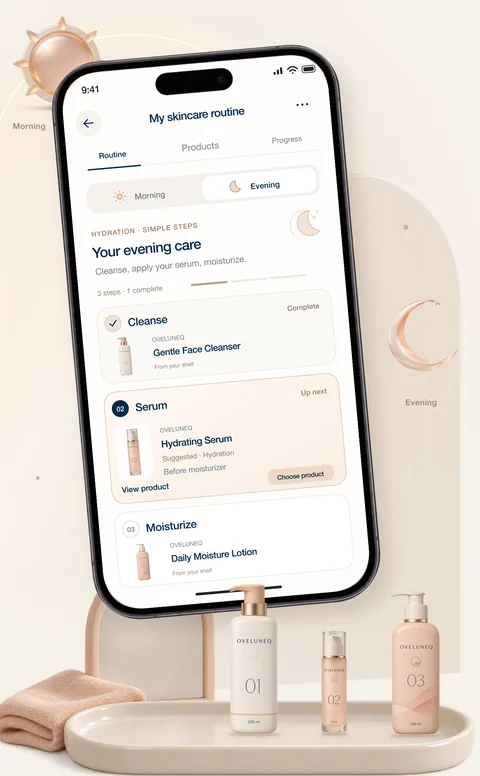
Switch between morning and evening to see the relevant steps. Each step explains its purpose, suggested order and available application details, so the plan is more useful than a list of product names.
There is no single sequence that fits every combination of products. Use the details for your actual plan, including any frequency notes, rather than assuming every product belongs in both sessions or should be used every day.
Find options that fit the plan
When you request product suggestions, the app can research options for your selected region and budget preference. Recommendations explain the step a product supports and why it is being suggested.
Store links, images and prices depend on the available sources. You can review a suggestion before deciding to use it; finding a store does not confirm that the product is in stock or that it will suit your skin.
Make the plan part of your day
Return to your saved routine for the morning or evening steps. Mark a step done or skip it for the day, and review usage details whenever you need a reminder.
You can revisit your product choices as your preferences change. The goal is a routine you understand and can follow, not a longer shopping list or a promise of a particular skin result.
Questions
Frequently asked questions
Can I make a routine without uploading a photo?
Yes. You can build a routine from the preferences and information you provide. Adding a face photo is optional.
Do I have to own products already?
No. You can select existing products, explore suggested products or combine both. Your product shelf is a starting point, not a requirement.
Does the routine treat skin conditions?
No. It organises cosmetic skincare and provides information. It does not prescribe medication, change a treatment or replace professional advice.
Can I build a routine for dry, oily or sensitive skin?
You can share those preferences and concerns when creating a routine. The plan uses the information you provide; it does not establish a skin type from a photo or guarantee that a suggested product will be tolerated.
Will it tell me which order to use my skincare products in?
The routine presents an ordered set of morning and evening steps with usage details. The order and frequency depend on the selected products and their available instructions, rather than a fixed sequence for everyone.
Can I make a skincare routine on this website?
The routine builder is a feature of the DermaScanAI mobile app. This page explains how it works. Open the app to choose your goals, add optional context and create your personal plan.