
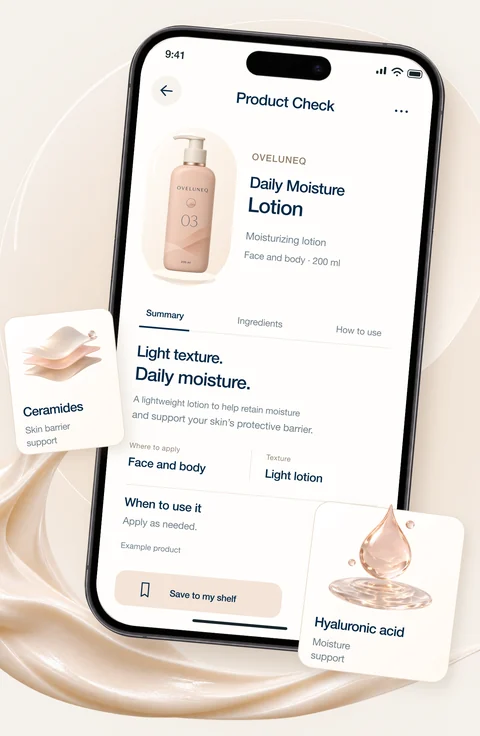
How Product Check works, step by step
Product Check is built for the moment you're holding a product and wondering whether it belongs in your routine. You don't need to type a single ingredient name.
- Open Product Check in the app and photograph the front of the pack or its ingredient label.
- Review or crop the photo so the brand and product name are easy to read.
- The app combines what's printed on the pack with web research to identify the product.
- Read the overview, the highlighted ingredients and the full ingredient list when it's available.
- Open the sources, compare store links for your region and save the product to your Shelf.
What the ingredient checker shows you
Each result starts with a plain-language overview of the product: what kind of product it is and what it's designed to do. Highlighted ingredients come next, each with a short note on its role in the formula, such as a humectant that draws in water, an emollient that softens or a preservative that keeps the product fresh.
When the exact product's full INCI list can be found, you can open that too. INCI is the standardized naming system used on cosmetic labels in many countries, which is why you'll see names like Aqua, Glycerin or Butyrospermum Parkii Butter instead of water, glycerin or shea butter.
Usage notes explain how and when the product is meant to be applied, where a source provides them. Every result lists the sources behind it, so you can open them and read the details yourself. Unfamiliar names are explained by what they do, not presented as a reason to worry.
Tips for a readable product or label photo
A clear photo helps the app find the right product, and the right version of it. These habits help most with small print and shiny packaging.
- Photograph the front first so the brand and full product name are readable.
- If the formula is unclear, add a close-up of the ingredient list on the pack or the box.
- Turn curved tubes and bottles so the text faces the camera, which cuts glare and warped letters.
- Use daylight or a bright room and skip the flash on glossy packaging.
- Include variant details printed on the pack, such as the SPF number or a fragrance-free label.
Getting the exact version right
One brand name can cover a whole range: a light and a rich version of the same cream, a new formula in familiar packaging, or a product sold with different ingredients in different countries. Product line, variant and pack size all help separate the item in your hand from a similar one.
If the exact formula or usage instruction can't be confirmed, the result keeps that gap visible instead of borrowing details from another product. That's when an ingredient-label photo is most useful.
Store links, your Shelf and your routine
The shopping region in Settings guides the search for stores. When those details can be sourced, a listing can show a product image, price and that store's own reviews. Prices and stock change, so check the store page before you buy.
Save products to your Shelf to come back to their ingredients and usage without scanning again, and keep the ones you use apart from the ones you're only considering. From there you can pick Shelf products when building a Care Routine, or tap Ask a question to ask the AI assistant how a product fits your morning or evening steps.
Who an ingredient checker is for
Product Check is handy whenever a label raises more questions than it answers, whether you're in a store aisle or sorting through your bathroom cabinet.
- Shoppers comparing two similar moisturizers or sunscreens before buying
- People who prefer to avoid a specific ingredient, such as added fragrance
- Beginners who want to know what a serum is actually for
- Anyone with a cabinet of products they no longer remember buying
What an ingredient list can't tell you
An ingredient list shows what's in a product, roughly in order of amount, but not exactly how much of each ingredient it contains. Product Check explains ingredients; it doesn't rate products as good or bad, and it doesn't automatically flag ingredient combinations across your routine.
It also can't predict how your own skin will get on with the finished formula. Follow the directions on the pack, and if you avoid a particular ingredient, double-check the list printed on the packaging itself, since formulas can change between batches and markets.
Questions
Frequently asked questions
Do I have to photograph the ingredient list?
Not always. A clear photo of the front, with the brand and product name readable, is often enough to start. Add an ingredient-label photo when the formula can't be found or you want to be sure you have the exact version.
Can I see the full skincare ingredient list, not just highlights?
Yes, when the exact product's full INCI list is available from the label or a supporting source, you can open it in the result. Highlighted ingredients give a shorter explanation; they aren't a substitute for the full formula.
Can the app tell me if a product will suit my skin?
No. It explains what the ingredients are and what they do in skincare, which helps you make your own choice. How your skin gets on with a product is personal, so follow the pack's directions and introduce new products one at a time.
Does Product Check flag ingredients that shouldn't be mixed?
Not automatically. It shows which ingredients each product contains. If you're unsure about using two actives together, ask the AI assistant a follow-up question or read our guide to skincare ingredients not to mix.
Why are some prices or images missing?
Some store pages don't expose a reliable price or a usable image. The product explanation is still shown without them. Prices and review scores come from the store listing at the time of the check, so open the store link for current details.
Can I check a product if its name is in another language?
Yes. The brand and product name help identify it even when they differ from your app language. Explanations follow your chosen language, while brand names and official product names may stay in their original form.