
Quick answer
- Same light every time: soft daylight facing a window, no flash.
- Same angles: front, left side and right side, at the same distance.
- Bare, clean face, hair pulled back, neutral expression.
- Turn off filters, beauty mode and auto-retouching.
- Once a week, on the same day and at the same time, is enough.
- Log product changes next to your photos so you know what changed.
What lighting is best for skin photos?
Lighting changes how skin looks more than anything else, so it's the most important thing to keep the same. Soft, indirect daylight is the most reliable: stand facing a window, not with the window behind you or to one side.
Avoid direct midday sun, which creates harsh shadows, and warm overhead bulbs, which add a yellow cast and make texture look deeper. Use the same spot in your home every time.
- Face a window with soft daylight; avoid direct sun
- Turn off overhead lights that mix warm and cool tones
- Don't use flash; it flattens and washes out skin
- Turn off filters, beauty mode and portrait smoothing
- Use the rear camera if someone can help, or the same front camera every time
Angles and distance: front, left and right
Three photos cover most of the face: one straight on and one from each side at about 45 degrees. Keep the phone at the same distance and height every time; arm's length at eye level is a simple rule to remember.
Taking progress pictures by yourself is easier with a phone stand and the timer. Mark where you stand and where the stand goes, so the framing matches from week to week.
- Pull your hair back and take off glasses
- Use a plain, neutral background
- Keep a relaxed, neutral expression
- Hold the phone at eye level at the same distance
- Take front, left and right photos in the same order
How often should you take skincare progress pictures?
Once a week is plenty for most people. Daily photos tend to make you focus on small day-to-day changes caused by sleep, light or the weather rather than your routine.
Pick the same day and time, ideally in the morning before applying any products, on a bare face. Consistency matters more than frequency.
Keep a simple skincare journal alongside your photos
Photos show how your skin looks; a journal tells you why it might have changed. A few lines each week are enough, whether you use a notes app, a template or a notebook.
If you want a record of your products without typing everything out, you can save them to your Shelf in DermaScanAI and keep your steps in Care Routine.
- The date and which photos you took
- Any new product, and the day you started it
- Products you stopped using
- How your skin felt that week: tight, shiny, comfortable
- Notable changes in sleep, stress, weather or travel

Why do my skin photos look different every day?
Two photos taken an hour apart can look surprisingly different. Light direction, white balance, phone camera processing, angle and distance all change how texture, shine and tone appear. Skin itself also looks different in the morning than after a long day, a workout or a hot shower.
That's why fair comparisons need the same setup each time. When two photos don't match, check the light and angle before deciding anything about your routine.
How do I know if my skincare is working?
There's no fixed timeline. How long it takes to notice a difference depends on the product, how consistently you use it, your skin and the season. Some changes, like how hydrated skin feels, can show quickly; changes in how even or smooth skin looks usually take much longer, and no product can promise a specific result.
A good rule is to give each new product several weeks of steady use before judging it, and to change only one thing at a time. That's where weekly photos and a journal pay off.
Daily habits for a more even-looking skin tonePrivacy: your skin photos are personal
Face photos are personal data, so handle them with care. Keep them in a private album rather than your main camera roll if others use your phone, think twice before syncing them to shared cloud folders, and don't post them anywhere you didn't mean to.
If you use an app for your photos, read its privacy policy to see how photos are stored and how you can manage or delete them.
In the app
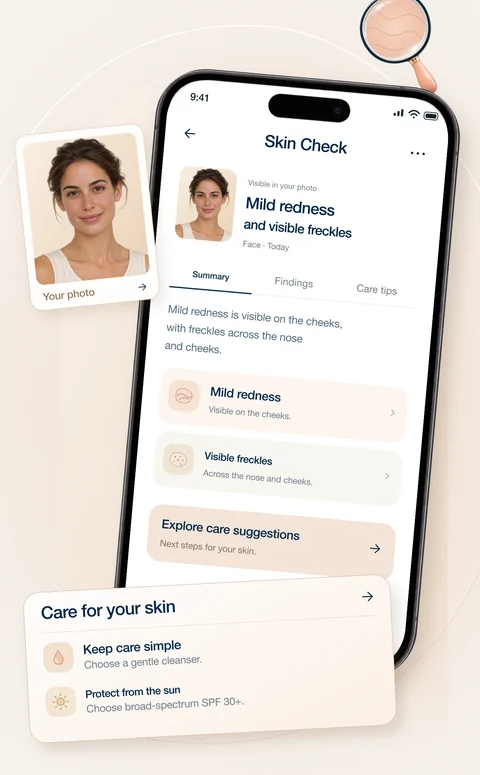
Try it in DermaScanAI: take a well-lit photo in Skin Check
Skin Check gives you a cosmetic overview of how your skin looks in a photo. You select the area, your skin type and phototype yourself, take the photo and get care tips. The tips in this guide on light and angle help keep your photos consistent.
Your results are saved in History, where you can filter them and look back at earlier checks to see how your skin looks over time.
- Open Skin Check and select the area, skin type and phototype
- Take a photo facing soft daylight, with no filters
- Read your cosmetic overview and care tips
- Find earlier results in History and filter them
Questions
Frequently asked questions
How do I take consistent skincare progress photos?
Use the same spot, light and distance each time: face a window in soft daylight, hold the phone at eye level at arm's length and take front, left and right photos. Keep your face bare, hair back and expression neutral, and turn off filters and beauty mode.
What lighting is best for skin photos?
Soft, indirect daylight from a window in front of you. Avoid direct sun, flash and warm overhead bulbs, which all change how texture and tone look. Cloudy days give the most even light, and taking photos at the same time of day helps keep conditions similar.
How often should you take skincare progress pictures?
Once a week is enough for most people. Pick the same day and time, ideally in the morning on a bare face. Daily photos tend to pick up changes from sleep, light or weather rather than your routine, which makes comparisons harder.
Why do my skin photos look different every day?
Light, camera processing, angle, distance and even the time of day all change how skin appears in a photo. Skin also looks different after sleep, exercise or a hot shower. Keep the setup the same each time so differences reflect your skin rather than your photo conditions.
Should I use filters or beauty mode for skin photos?
No. Filters, beauty mode and portrait smoothing change texture and tone, so photos can't be compared fairly. Turn them off in your camera settings and check that your phone isn't applying automatic retouching to the front camera.
How long does it take for skincare to work?
It varies, and no product can promise a timeline. How hydrated skin feels can change quickly, while changes in how even or smooth skin looks usually take longer. Give each new product several weeks of consistent use and change one thing at a time.